LAUNCH OFFER 50% off Pro for your first 3 months — just $2.50 per user / month.
CrewConnect — for cafés, restaurants, food trucks & retail

Spend less time managing staff. More time running your business.

RooWorks' CrewConnect helps cafés, restaurants and retailers simplify staff rostering and time tracking, so managing your team takes less effort.

Free setup — we do it for youAustralian support — replies within 1 business dayNo card neededData hosted in Sydney
crewconnect.rooworks.app/dashboard/schedule
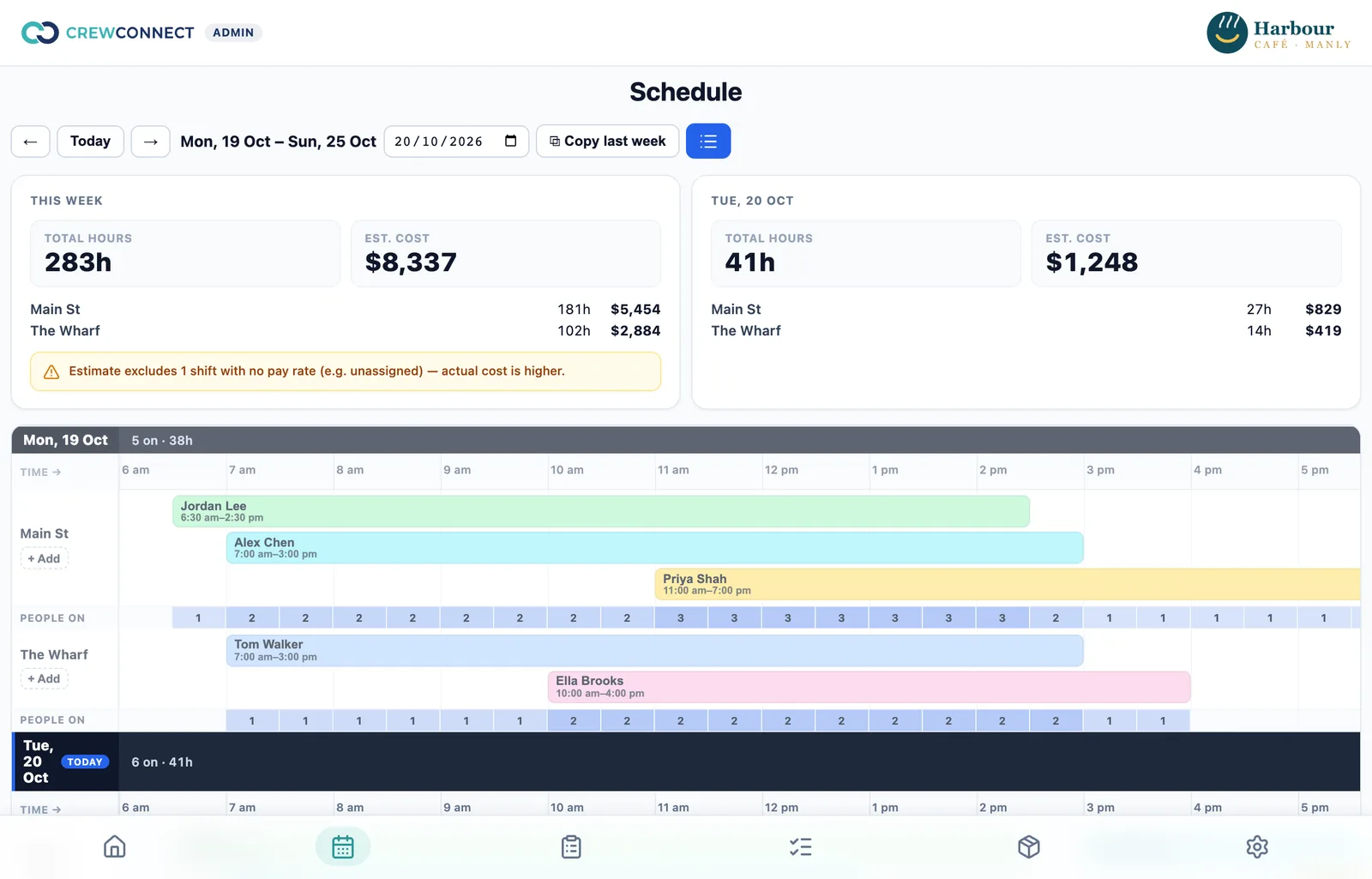
The weekly schedule: shifts per location on a time grid, with hours and estimated wage cost for the week
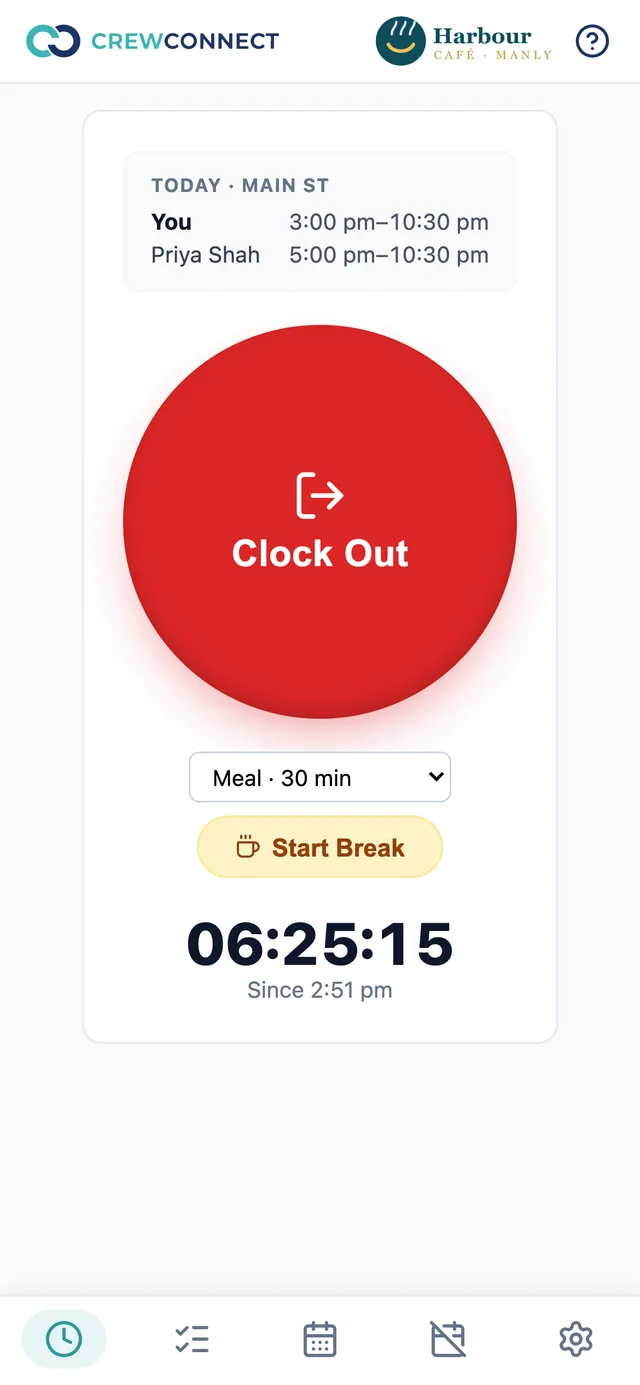
The staff app: today's shift with teammates, a large Clock Out button and the live timer
☕ Cafés🍽️ Restaurants🚚 Food trucks🛍️ Retail📍 Multi-location groups
Everything in Starter

Run the week without the spreadsheet.

The essentials every shift-based business needs — free for small teams.

Rostering

Build the week in minutes, and know what it costs.

A visual week grid shows every shift by location, with a headcount strip so you can see the gaps at a glance.

  • Shifts on 15-minute steps, across all your locations
  • Hours and estimated wage cost for the week and the day, per location
  • Copy last week in one tap — anyone who's marked themselves unavailable is left off
  • Staff see their shifts and who they're working with, straight away
Schedule
Schedule grid with coloured shifts per person and a people-on strip
Time clock

Clock in from the phone. See who's on, live.

Every punch belongs to a rostered shift, so there's no guessing what someone was working. Managers see today's shifts and who's in, as it happens.

  • One big button: Clock In, Clock Out — server time, not the phone's
  • Breaks with your own types, paid or unpaid
  • Clock-in opens an hour before the shift starts
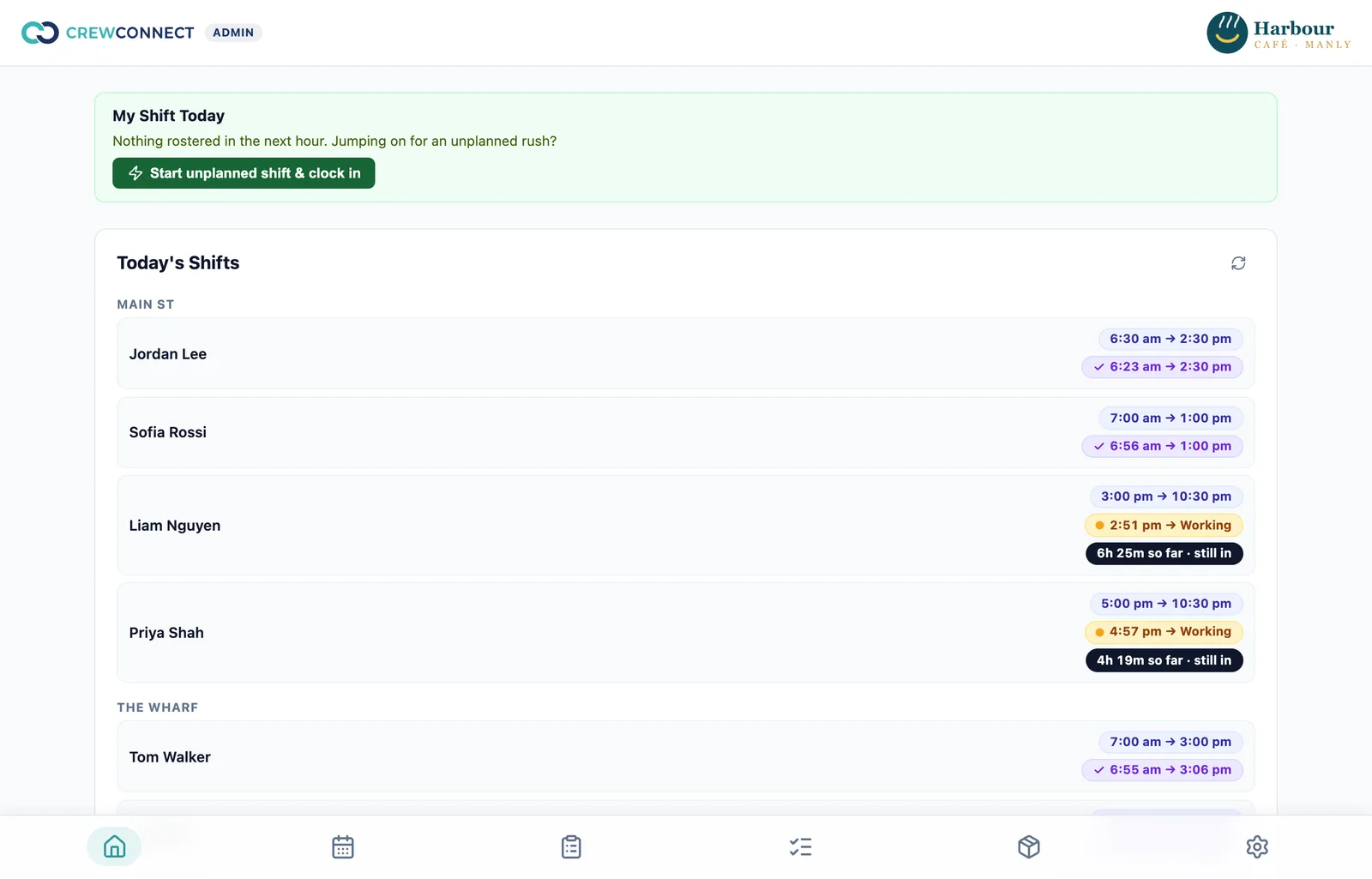
  • Today's board: rostered vs actual for every shift, at every location
Today's shifts
Today's shifts per location showing rostered and actual times and who is still working
Staff clock screen
Timesheets & payroll summary

Hours you can trust, ready for your payroll.

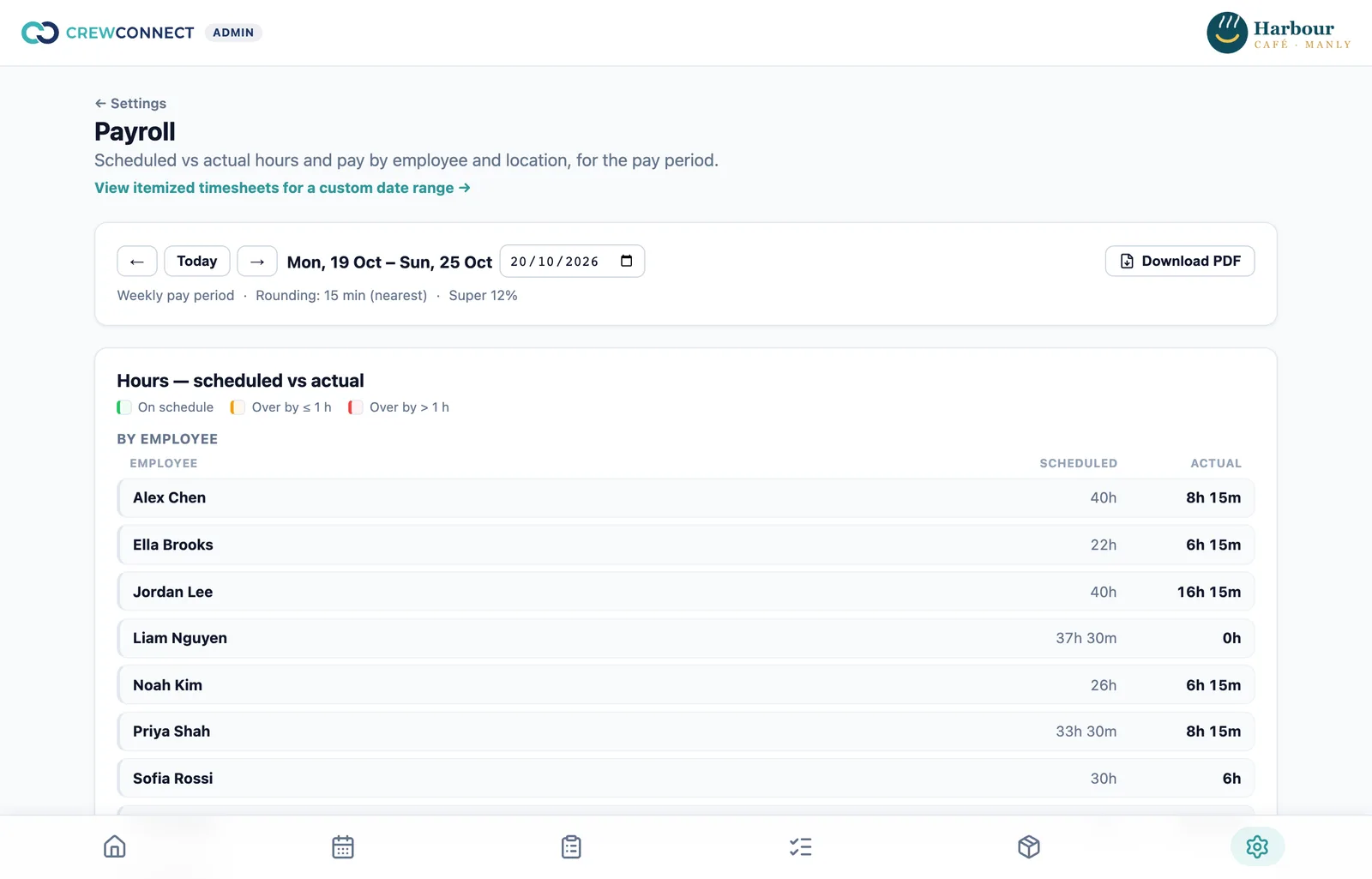
Scheduled vs actual hours and pay for the pay period, by employee and by location — with your rounding and super settings applied.

  • Weekly, fortnightly or monthly pay periods, per location
  • Hour rounding applied once per person per period, never compounded
  • Fix a missed clock-out with a required note — every change is audited
  • Download timesheets and the summary as a PDF

How the time clock and timesheets work

Payroll
Payroll summary: scheduled versus actual hours per employee for the week
The staff app

Your team's shifts, hours and time off — in their pocket.

CrewConnect installs from the browser onto any phone. No app store, nothing to update.

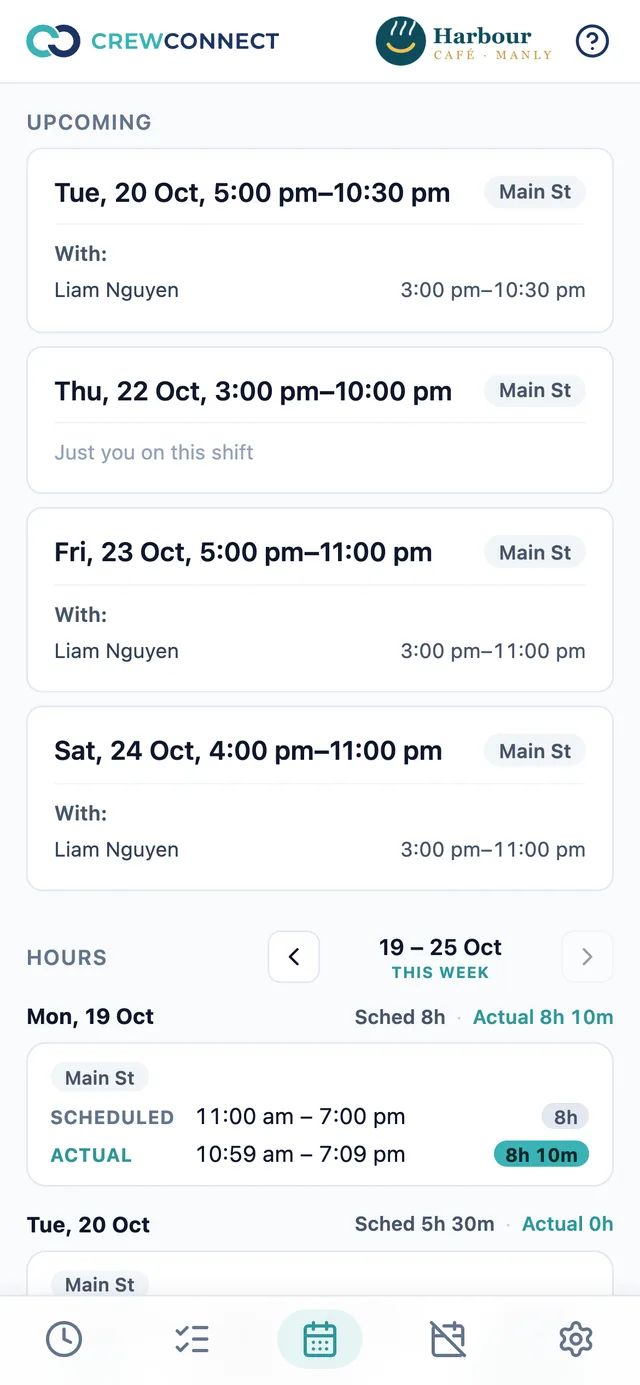
  • Upcoming shifts, with who's working alongside them
  • Their own hours this week: scheduled vs actual
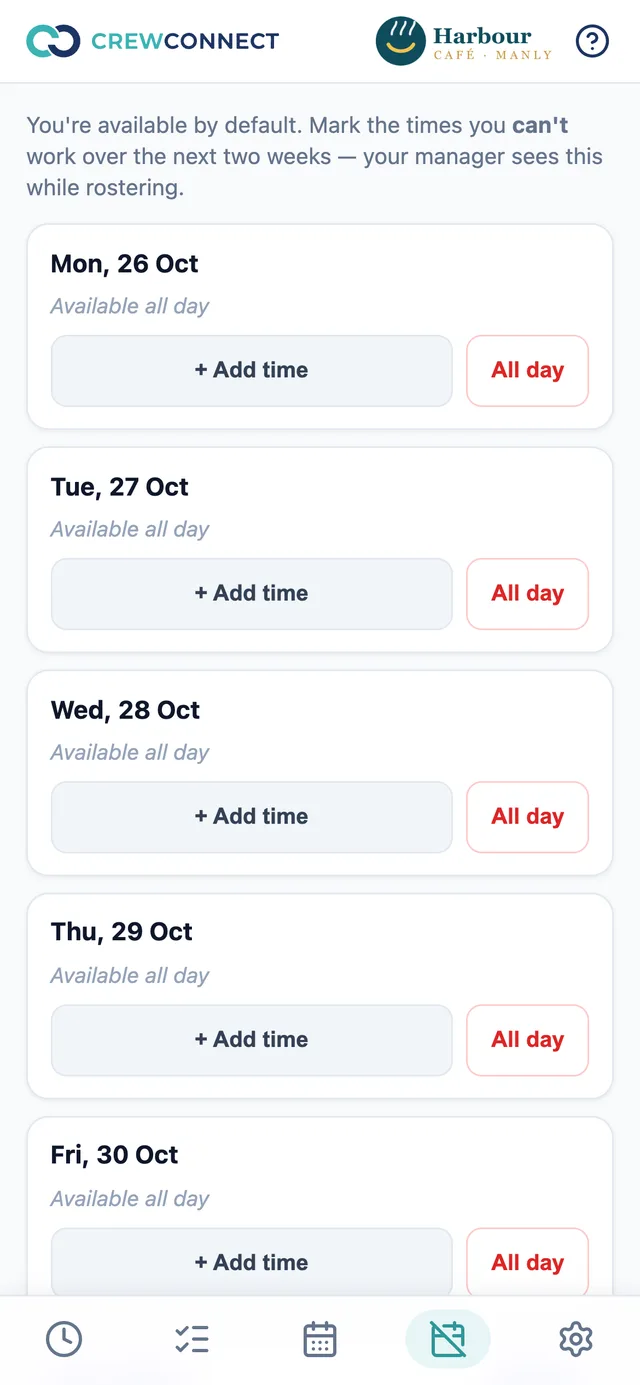
  • Mark the times they can't work — managers see it while rostering
  • A built-in how-to guide, also as a PDF
Upcoming shifts with teammates and this week's hours
Time off: mark the times you can't work
📍

Many locations, one team

Roster anyone at any location. Each location keeps its own settings, time zone and reports.

🧾

A full change log

Who changed which shift, punch or setting — before and after, with filters and search. See how →

🎨

Your brand

Your logo in the app for everyone, and on the documents you send.

🔒

Roles that make sense

Owners, managers and staff each see what they need — and nothing they don't.

Change log · included in every plan

Every change, on the record.

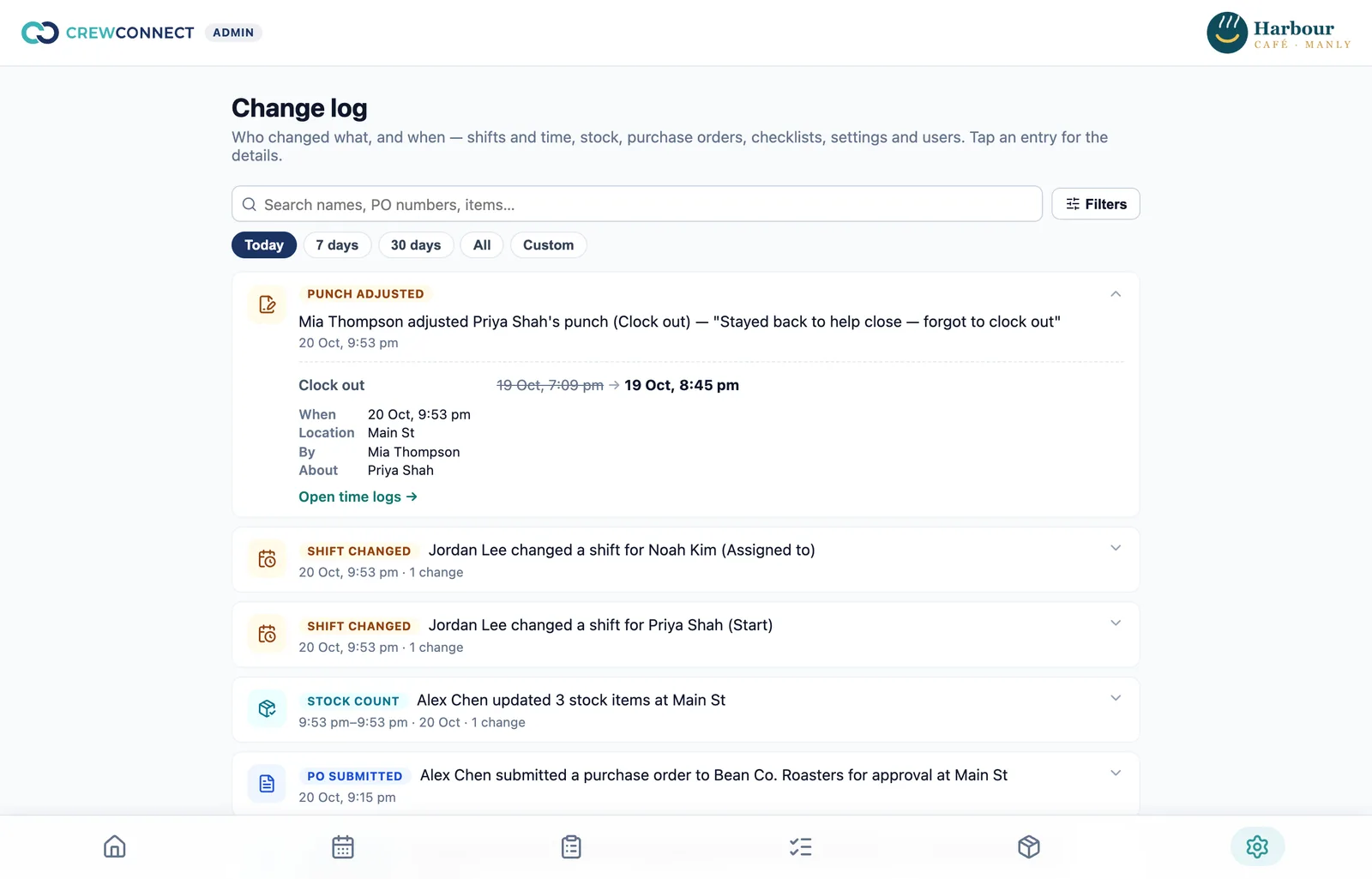
Who moved a shift, fixed a punch, counted stock or sent an order — and exactly what it was before. When a question comes up on payday, the answer is one search away.

  • Before → after for every edit: shift times and assignees, clock-ins and outs, stock counts, purchase orders, settings and users
  • Fixing someone's hours needs a written reason — it's shown right in the log
  • When, where, by whom and about whom — with a link straight to the record
  • Filter by date, location, person or area, and search names, PO numbers and items
  • A busy count shows as one tidy entry: "Alex updated 12 stock items"
  • Entries can't be edited or deleted — not even by the owner
Change log
Change log: a punch adjustment opened to show clock out 7:09 pm changed to 8:45 pm with the reason, plus shift changes and stock counts
$0SETUP
FEE
Done for you

We set you up end to end — at no extra cost.

Don't lose a weekend to setup. Send us what you use today — spreadsheets, paper rosters, checklists, stock sheets — and we'll have CrewConnect ready for your team.

  1. Your business, loaded in. Locations, staff, pay rates and settings.
  2. Your lists, not ours. Your opening and closing checklists, stock items and suppliers, entered for you.
  3. Your first roster, live. We build it with you and get your team clocking in.
  4. A walkthrough for your managers and a how-to guide for your staff.
Book your free setup
Australian support

Real people, here in Australia.

No overseas call centre and no chatbots. You talk to the team that builds CrewConnect — on Australian time.

We reply within one business day.

  • Book a call, or email us — a real person answers
  • Help on your hours, not the middle of the night
  • Your data stays in Sydney
  • Built for Australian businesses: AUD, GST, super and the July financial year
CrewConnect Pro PRO

Run the shop floor, not just the roster.

Pro adds the jobs that happen between clocking in and clocking out: the opening and closing routine, what's on the shelf, and what to order.

Shift checklists

Open and close right, every shift.

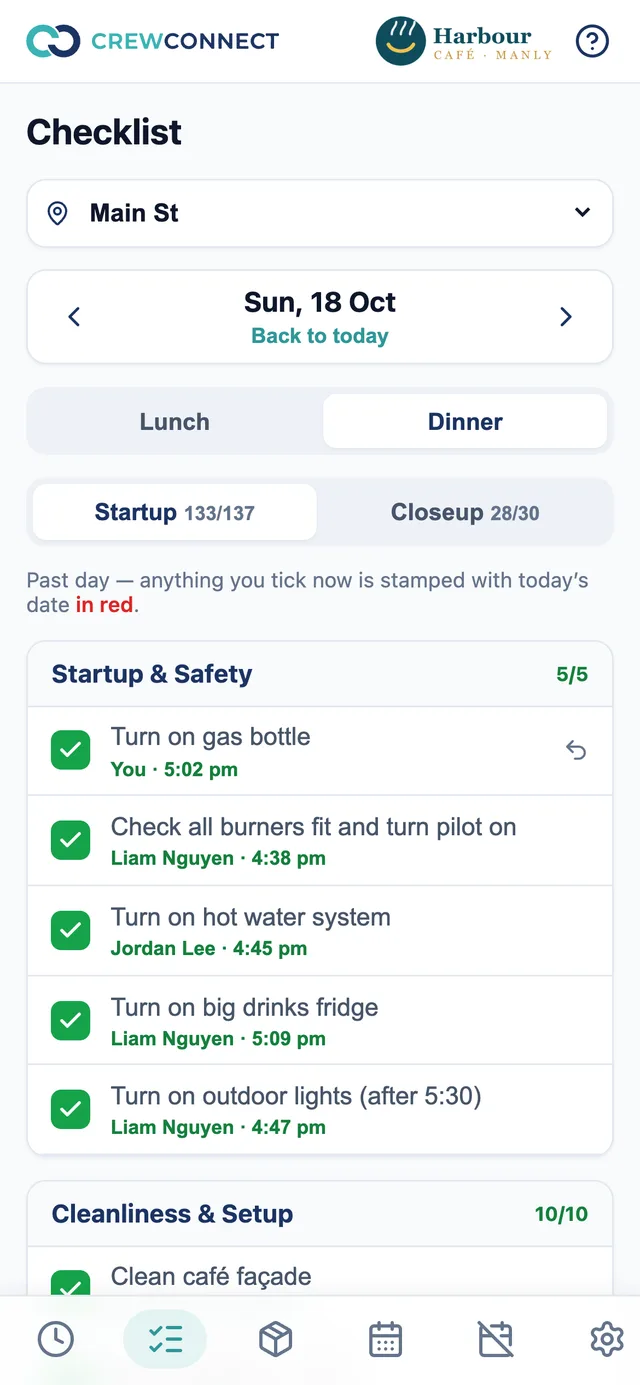
Replace paper startup and closing sheets with one shared checklist on every phone — and see exactly who did each task, and when.

  • A startup and closeup list for each trading session
  • Every tick records the person and the time; late ticks are stamped in red
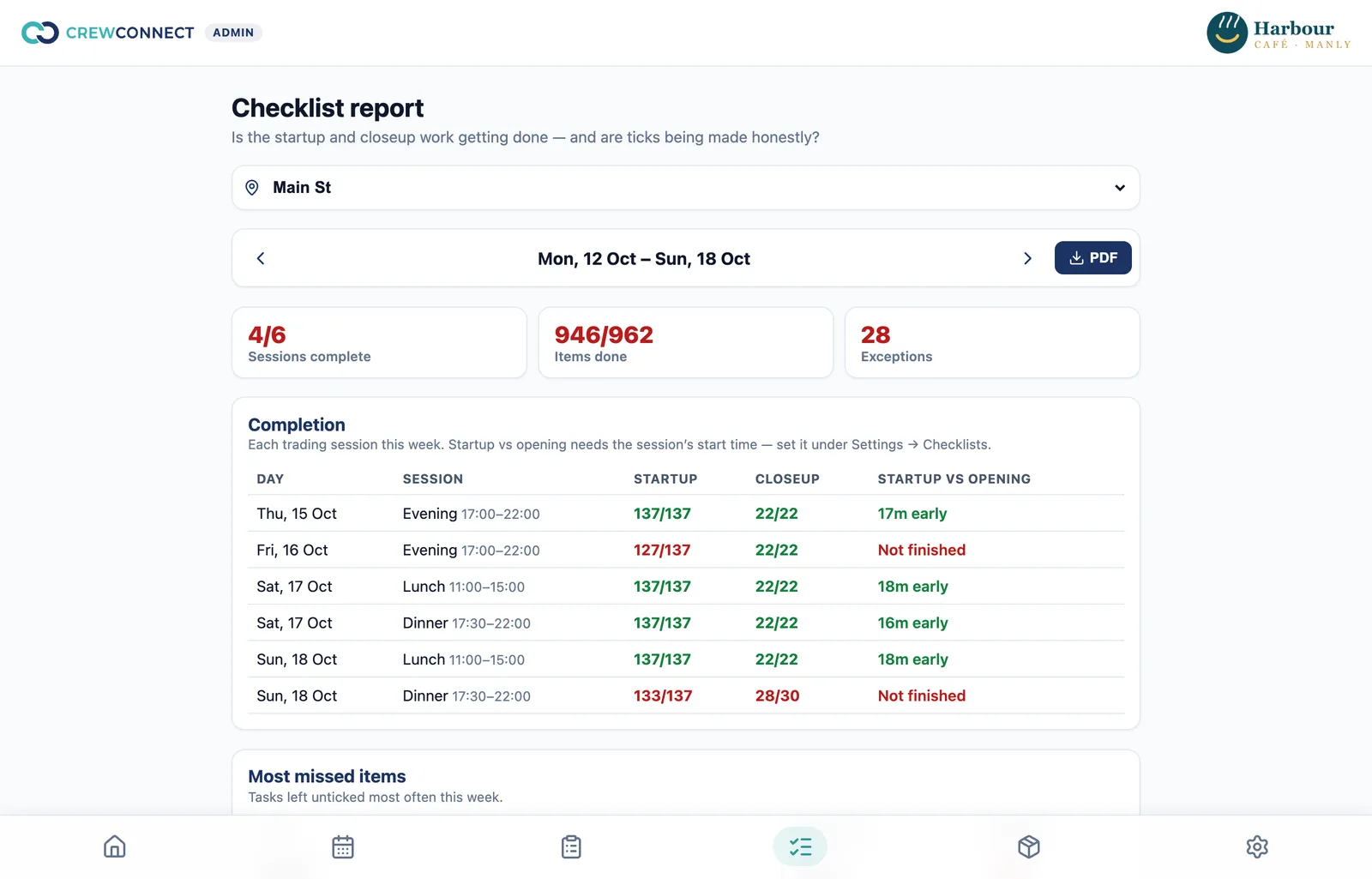
  • Weekly report: completion, startup vs opening time, most-missed tasks
  • Flags ticks made off shift, bursts of ticks, back-filled days and unticks
Checklist report
Weekly checklist report: sessions complete, items done, startup vs opening time
Checklist on the phone with who ticked each task and when
Stock control

Know what's on the shelf — before you run out.

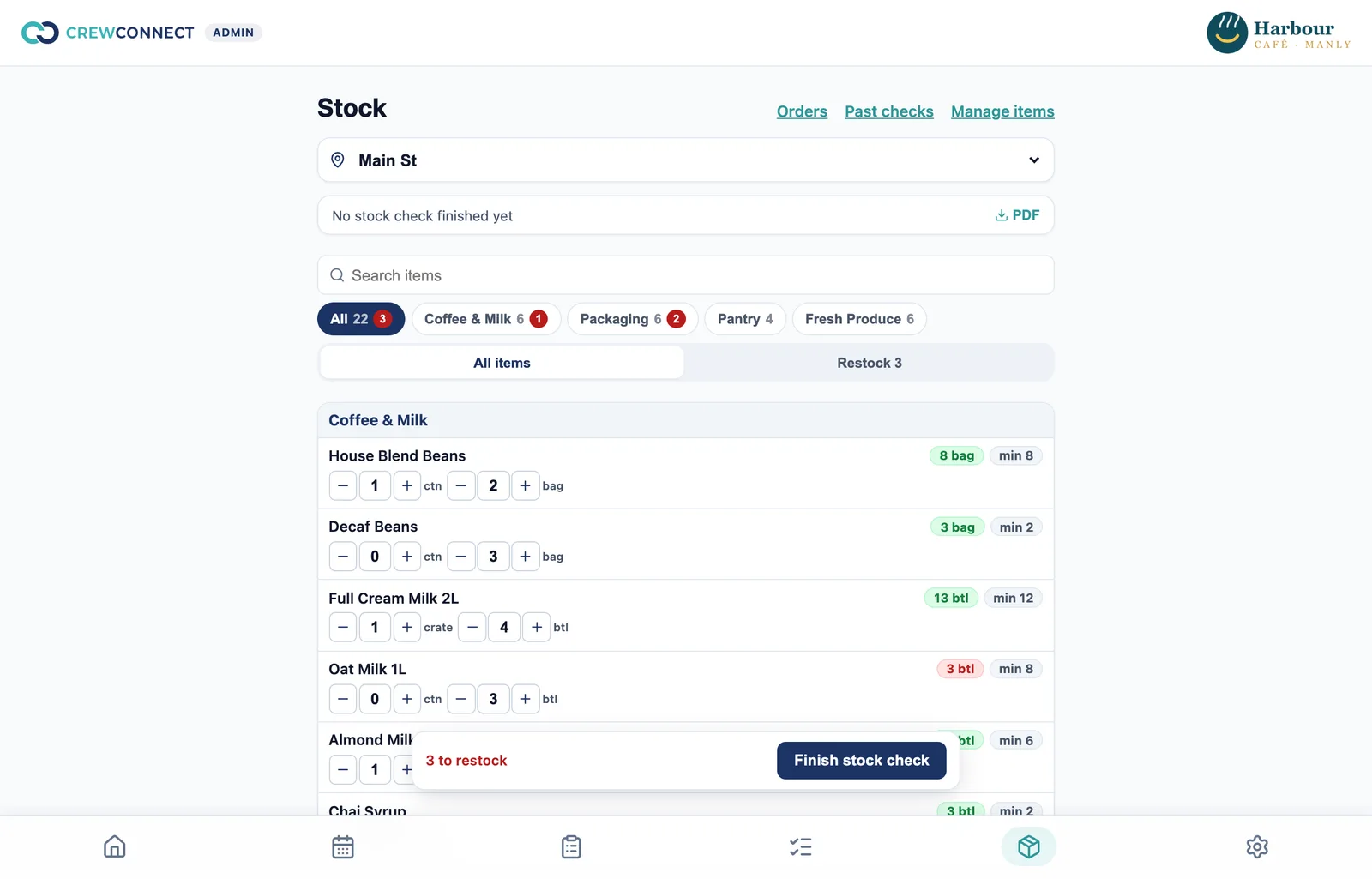
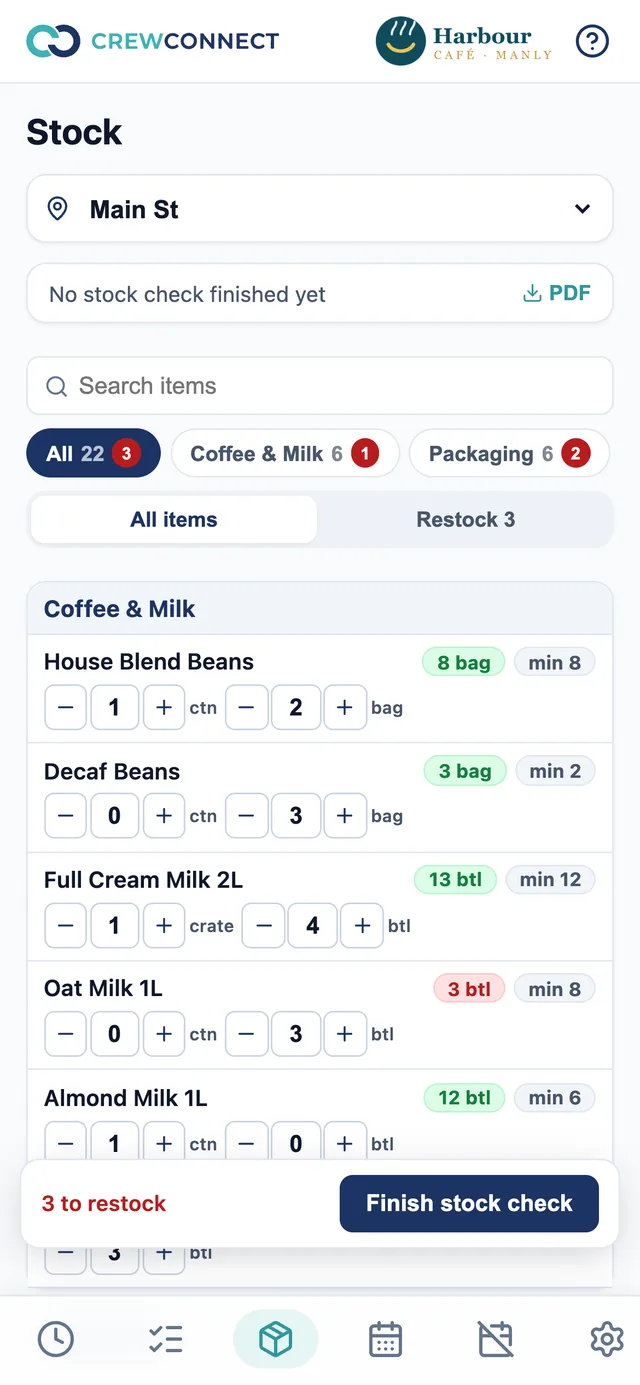
Live stock levels for every location, counted on a phone by the people you nominate, with a restock list that builds itself.

  • Cartons and packs, green or red against each item's minimum
  • Counts save themselves as you tap, with Undo
  • Order lists for fresh produce: record how much to buy
  • Finish a check to freeze it: history, restock list and a PDF
Stock
Stock levels by category with on-hand and minimum chips
Counting stock on the phone
Purchase orders

From restock list to supplier inbox in two taps.

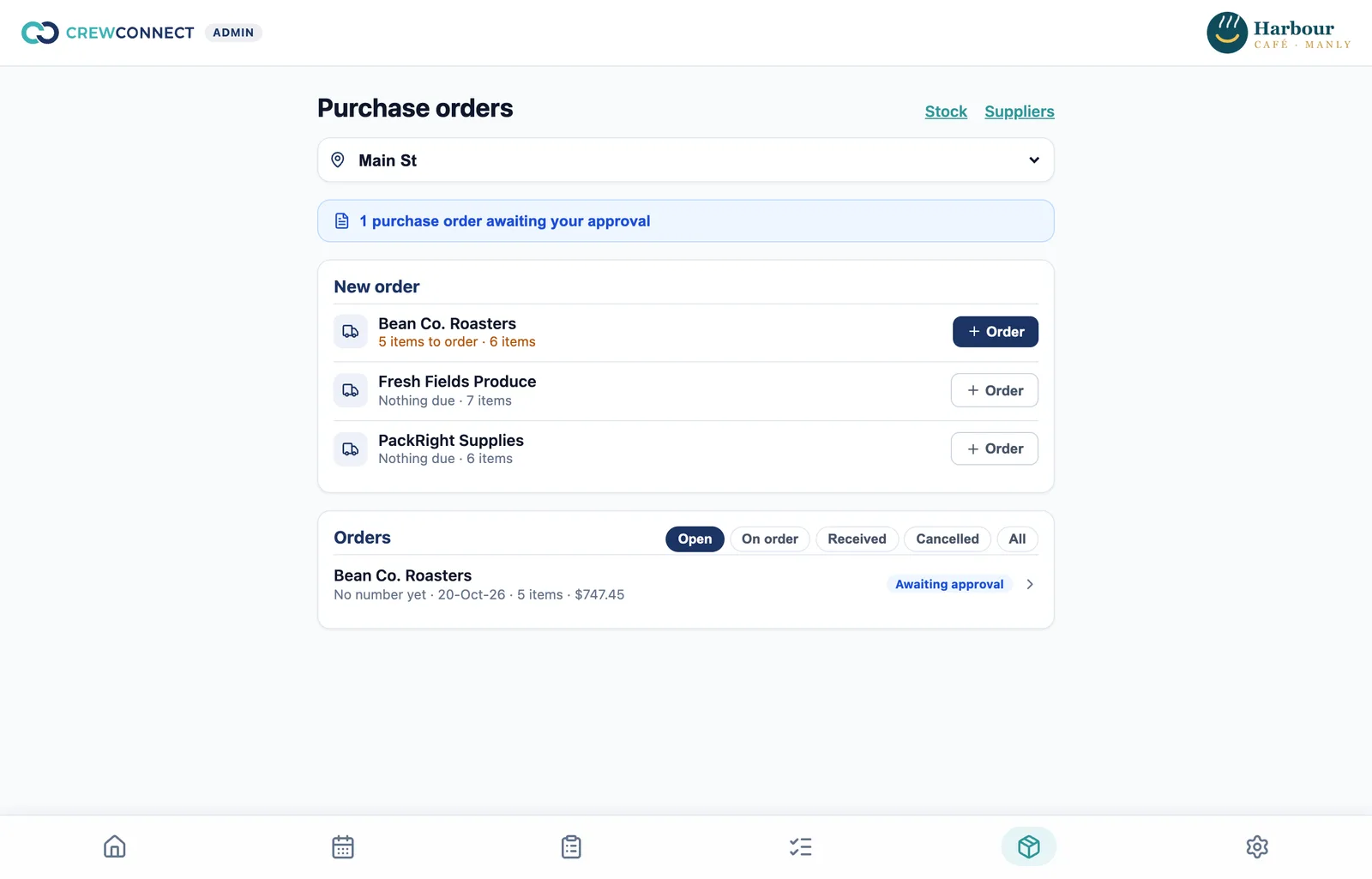
Draft one purchase order per supplier from what's running low, approve it, and email a branded PDF — then add the delivery to stock when it arrives.

  • Staff prepare and submit; an owner approves and sends
  • Numbered per location, supplier and financial year
  • Your logo, delivery details, terms and GST totals on the PDF
  • Mark received — short deliveries included — and stock updates itself; nothing gets ordered twice

How stock control and purchase orders work

Purchase orders
Purchase orders: suppliers with items due, and orders awaiting approval
A purchase order PDF with logo, supplier, delivery details and GST totals
Pricing

Start free. Upgrade when you're ready.

Simple per-user pricing in Australian dollars. No lock-in contracts.

Starter

For small teams getting off the spreadsheet.

$0forever

Up to 5 staff

  • Rostering across locations, with wage-cost estimates
  • Phone time clock, breaks and live "who's on"
  • Time adjustments with an audit trail
  • Timesheets and payroll summary (PDF)
  • Staff app: shifts, hours and time off
  • Your logo and the change log
  • Free setup, done for you
Start free

Enterprise

For groups with many venues or brands.

Let's talk

Tailored to your group

  • Everything in Pro
  • Setup across multiple brands or regions
  • Custom reports and imports
  • Priority support
  • A say in what we build next
Talk to us
$30 / month on Pro for your first 3 months, then $60
Compare plansStarterProEnterprise
Team
StaffUp to 5UnlimitedUnlimited
LocationsUnlimitedUnlimitedUnlimited
Owners, managers and staff roles✓✓✓
Rostering & time
Weekly schedule, copy last week, unavailability✓✓✓
Wage-cost estimate per location✓✓✓
Phone time clock and breaks✓✓✓
Time adjustments with audit trail✓✓✓
Timesheets and payroll summary, PDF✓✓✓
Shop floor
Shift checklists—✓✓
Weekly checklist report—✓✓
Stock control—✓✓
Purchase orders and suppliers—✓✓
Admin
Your logo, change log✓✓✓
Free setup, done for you✓✓✓
Support from Australia, replies within 1 business day✓✓✓
Priority support——✓
Customers

Running real venues across Western Sydney.

We used to run two kitchens off paper — a startup sheet on the wall, a stock sheet on a clipboard and supplier orders typed into a notes app. Now Blacktown and Vineyard run the same opening and closing checklists on everyone's phone, stock gets counted in minutes, and our orders go to suppliers as a proper PDF. When the vegetables arrive, whoever's on shift marks them received and the stock is right.
Shift checklistsStock controlPurchase orders
SHOwner, Surti HouseBlacktown & Vineyard, NSW
Rostering two stores used to take my Sunday night. Now I copy last week, fix a few shifts and it's out — and I can see the wage cost before I publish. Staff clock in on their own phones at whichever store they're working, and pay day is a PDF instead of a calculator.
RosteringPhone time clockTimesheets
SAOwner, Surti AndaWentworthville & Marsden Park, NSW
On the roadmap

What we're building next.

Planned, not promised — tell us what matters most to your business and we'll prioritise it.

Planned

Roster notifications

Email and push when the roster is out, a shift changes, or someone's running late.

Planned

Leave requests & approvals

Staff request leave in the app; managers approve it and the roster knows.

Planned

Shift swaps & open shifts

Offer a shift to the team and let staff swap — with a manager's OK.

Planned

Clock-in on site

Optional location check so clock-ins only count at the venue.

Planned

Payroll export

Send approved timesheets to Xero and other payroll providers.

Planned

Award rates & penalties

Weekend, night and public-holiday rates in the wage estimate.

Idea

Labour cost vs sales

Bring in daily sales from your POS and see wages as a percentage.

Idea

Food safety records

Fridge temperatures and cleaning logs alongside your checklists.

Questions

Good to know.

Do my staff need to download an app?

No. CrewConnect works in the phone's browser and can be added to the home screen like an app — no app store, nothing to update.

What counts as a user?

Each active staff member — owners, managers and employees. Deactivated staff don't count.

What happens when I grow past 5 staff?

Starter is free for teams of up to 5. Bigger teams move to Pro, which is $5 per user per month and adds checklists, stock and purchase orders.

Can I run more than one location?

Yes, on every plan. Staff can work at any location, and each location has its own settings, time zone, checklists and stock.

Does CrewConnect pay my staff?

No — it gives you accurate hours and a pay summary for the period, which you or your bookkeeper take into your payroll system. A direct payroll export is on the roadmap.

Where is my data stored?

In Sydney, Australia, on Supabase (PostgreSQL), with the app hosted on Vercel.

Is setup really free?

Yes. On every plan we set up your locations, staff, settings, checklists, stock items and suppliers from what you already use, and help you get your first roster out. There's no setup fee.

How does the 50% off offer work?

New Pro customers pay $2.50 per user per month for their first 3 months. After that, Pro is $5 per user per month.

Who answers when I need help?

Our own team in Australia — the people who build CrewConnect. We reply within one business day. Book a call, email hello@rooworks.app or chat on WhatsApp.

Can I try Pro before paying?

Yes — sign up free, then request Pro from any Pro page in the app and we'll get in touch to set you up.
Get next week's roster out tonight.

We'll set you up for free, with support from Australia. Starter is free for up to 5 staff, and Pro is 50% off for your first 3 months.